
From 1, 32, and Beyond—All Machines on One Dashboard
Real-Time Production Monitoring, Infinitely Scalable
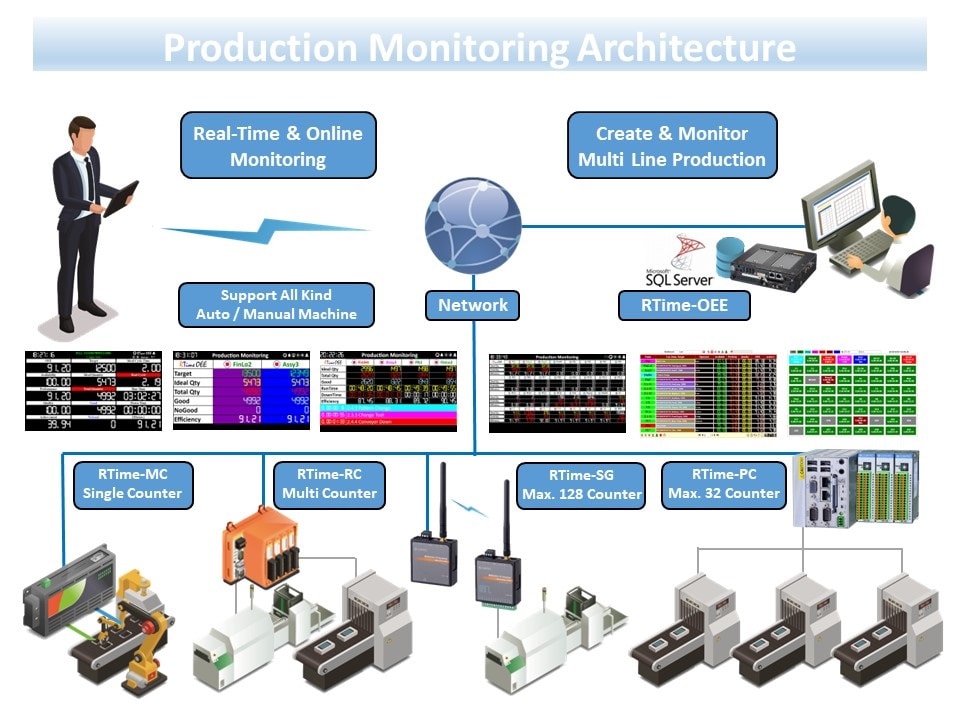
RTime-OEE transforms disconnected machines into one intelligent network with live monitoring, automatic OEE calculation, and smart maintenance systems. See exactly what's happening—right now—on every production line.
Live Demo Access: admin / admin123 | Free ROI Analysis Available
The Six Big Losses Draining Your Profits Every Hour
Every manufacturing operation faces these universal profit killers. Most companies measure them poorly—or not at all. RTime-OEE makes every loss visible, measurable, and manageable.
The Hidden Cost of Invisible Losses
A typical factory loses substantial production capacity to these six categories—often without realizing the full scope. Equipment breakdowns, setup delays, minor stoppages, reduced speed, startup rejects, and production rejects combine to erode profitability silently. World-class manufacturers track and minimize all six loss categories systematically.
Six Big Losses Infographic Placeholder
Image: six-big-losses-infographic.png (1200×400px)
Equipment Breakdowns
The Problem:
Unplanned equipment failures stop production completely. No warning, no data on why it happened, no way to prevent the next breakdown.
RTime-OEE Solution:
RTime-OEE automatically detects downtime and categorizes breakdowns. Track MTBF (Mean Time Between Failures) and MTTR (Mean Time To Repair) for every machine. Identify patterns before catastrophic failures occur.
The Result:
Maintenance teams respond faster with complete breakdown history. Transition from reactive firefighting to predictive maintenance strategies.
Setup & Changeovers
The Problem:
Every product changeover means production stops. Setup times vary wildly between operators. Nobody knows the fastest setup method or why some take longer.
RTime-OEE Solution:
RTime-OEE tracks 5 operational modes: Production, Setup, Standby, Maintenance, and No Schedule. Every changeover is timed automatically. Compare operator performance and identify bottlenecks instantly.
The Result:
Standardize setup procedures based on data from your best performers. Reduce changeover times through systematic improvement and operator training.
Minor Stoppages
The Problem:
Small jams, sensor glitches, manual interventions—each one costs minutes. They happen dozens of times per shift but never get documented. Invisible profit drain.
RTime-OEE Solution:
Real-time monitoring catches every stoppage, no matter how brief. Track offset counts, cycle interruptions, and recovery times. Visibility into problems you didn't know existed.
The Result:
Address root causes of frequent minor issues. Measurable reduction in nuisance stoppages through targeted corrective actions.
Reduced Speed
The Problem:
Machines running slower than design capacity. Operators manually slow things down to 'reduce defects.' Theoretical cycle time is a distant memory.
RTime-OEE Solution:
Cycle time monitoring for every single part produced. Compare actual speed against ideal cycle time continuously. Performance metric visible in real-time dashboard.
The Result:
Identify speed loss patterns by shift, operator, or product type. Implement corrective measures to restore optimal operating speeds.
Startup Rejects
The Problem:
First pieces after changeover are often scrap. Warm-up period wastes material. New operators struggle without clear first-piece inspection standards.
RTime-OEE Solution:
First-piece inspection workflow integrated into RTime-OEE. SOP integration with PDF documents and MP4 training videos. Guided startup procedures reduce initial defects.
The Result:
Reduce startup scrap through standardized procedures. New operators reach proficiency faster with embedded training resources.
Production Rejects
The Problem:
Defects discovered hours after production—entire batch at risk. Manual quality tracking means delayed response. Root cause analysis is guesswork.
RTime-OEE Solution:
Quality metric tracking tied directly to production cycles. Return management system for defective parts. Real-time defect alerts enable immediate corrective action.
The Result:
Contain quality issues faster. Build toward zero-defect production through continuous quality monitoring and rapid response.
Transform Every Loss Into Opportunity
Real-Time
Visibility into all six loss categories continuously
Preventable
Many losses through systematic measurement and improvement
Measurable
ROI through OEE improvement and waste reduction
Master the OEE Formula That Transforms Profits
OEE (Overall Equipment Effectiveness) is the gold standard for measuring manufacturing productivity. But understanding the formula is just the beginning—accurate real-time data makes the difference between guesswork and genuine improvement.
OEE Formula Diagram Placeholder
Image: oee-formula-diagram.png (800×400px)
The Complete OEE Formula
OEE = Availability × Performance × Quality
Based on ISO 22400-2:2014 Standard | World-Class Manufacturing Benchmark
Without RTime-OEE (Baseline)
- ✗Manual data collection with substantial time lag
- ✗Estimated downtimes instead of precise measurements
- ✗Spreadsheet calculations prone to human error
- ✗End-of-shift or end-of-day reporting only
- ✗No visibility into which component (A/P/Q) is the bottleneck
With RTime-OEE (Transformation)
- ✓Automatic real-time data capture from machine sensors
- ✓Precise downtime tracking to the second
- ✓Calculations computed automatically and error-free
- ✓Live dashboard updates every cycle
- ✓Instant identification of limiting factor for targeted improvement
Understanding Each Component
Availability
Operating Time ÷ Planned Production Time
Measures losses from equipment breakdowns and setup/changeover times. Answers: "What percentage of scheduled time is the machine actually running?"
Example Improvement:
Reducing changeover time from significant duration to minimal duration increases available production time substantially.
RTime-OEE Impact: Automatic downtime detection with categorization achieves world-class availability targets faster.
Performance
(Actual Output ÷ Theoretical Output)
Measures speed losses from minor stoppages and reduced operating speed. Answers: "Is the machine running at its designed cycle time, or slower?"
Example Improvement:
Restoring cycle time from slower rate to optimal design speed yields substantial additional output per shift.
RTime-OEE Impact: Cycle time monitoring for every part reveals speed loss patterns and drives optimal capacity utilization.
Quality
Good Parts ÷ Total Parts Produced
Measures losses from defects and rework. Answers: "What percentage of produced parts meet quality standards on the first pass?"
Example Improvement:
Reducing defect rate from higher percentage to minimal percentage saves substantial material costs and rework labor.
RTime-OEE Impact: Real-time quality tracking with defect categorization enables rapid corrective action toward zero-defect goals.
From Formula to Factory Floor Reality
Understanding the OEE formula is important. But collecting accurate data automatically, calculating it in real-time, and making it visible to operators and managers—that's where RTime-OEE transforms theory into measurable results.
World-Class OEE Target: Multiple Components Above Industry Benchmarks
One Dashboard. Complete Visibility. Instant Insights.
Monitor from 1 to 32 machines simultaneously. Every production line visible at a glance with real-time counters, status indicators, and instant alerts.
REAL-TIME PRODUCTION INTELLIGENCE:
Live production counters with offset tracking
Automatic downtime detection and alerts
Visual SOP guides (PDF/MP4 video) right on dashboard
Product images for error-proof production
Color-coded status indicators (Running/Idle/Down)
Audio and visual alarms for immediate response
Current shift and operator information
Target vs actual comparison in real-time
SCALABLE VIEWS FOR ANY FACTORY SIZE:
Single-Line Monitoring (1 machine)
Full detail view, all metrics visible
Work Cell Monitoring (2-4 machines)
Department-level oversight
Production Line (8-16 machines)
Complete line visibility
Entire Factory (up to 32 machines)
Plant-wide command center view
INTERACTIVE DEMO AVAILABLE
From Beginner to Expert: 5 Modes That Grow With You
Start simple, grow sophisticated. No steep learning curve. Operators master one level at a time. Support any production complexity from manual shop to Industry 4.0.
LEVEL 1: MANUAL DATA INSERT
Perfect for: New products, training, setup phase
HOW IT WORKS:
- Operator enters: Product name, target quantity, cycle time, operator name
- System learns: Automatically saves to database for future use
- Time to start: 2 minutes
BEST FOR:
Mode 1 Interface
Manual mode interface with operator input controls showing input form
Image: mode-1-manual-operation.png
(800×600px)
LEVEL 2: MANUAL DATA SELECT
Perfect for: Repeat products, database established
HOW IT WORKS:
- Operator selects: Product name from dropdown menu
- System auto-fills: Target, cycle time, specifications
- Time to start: 30 seconds
BEST FOR:
Mode 2 Interface
Product selection mode with dropdown menu interface showing product list
Image: mode-2-product-select.png
(800×600px)
LEVEL 3: SCHEDULE SELECT
Perfect for: Batch production, weekly planning
HOW IT WORKS:
- Supervisor creates: Production schedule in advance
- Operator selects: Schedule from list
- System executes: One-click production start
- Time to start: 10 seconds
BEST FOR:
Mode 3 Interface
Schedule selection interface with production calendar and schedule list
Image: mode-3-schedule-select.png
(800×600px)
LEVEL 4: AUTO-REPEAT
Perfect for: Dedicated lines, high-volume runs
HOW IT WORKS:
- Setup once: Product, target, cycle time
- Operator presses: Start button only
- System repeats: Same product automatically until stopped
- Time to start: 5 seconds (per cycle)
BEST FOR:
Mode 4 Interface
Auto-repeat mode showing continuous production cycle with auto-repeat indicator
Image: mode-4-auto-repeat.png
(800×600px)
LEVEL 5: AUTO-SHIFT
Perfect for: 24/7 operations, lights-out manufacturing
HOW IT WORKS:
- Configure once: Shift schedule and product assignments
- System automatically: Starts production when shift begins
- Operator action: None required
- Time to start: 0 seconds (automatic)
BEST FOR:
Mode 5 Interface
Auto-shift mode with automated shift schedule interface showing lights-out operation
Image: mode-5-auto-shift.png
(800×600px)
OPERATIONAL FLEXIBILITY ADVANTAGE
Perfect for startups and training
Most common production mode
Planning and efficiency
High-volume manufacturing
Industry 4.0 ready
Your factory evolves.
RTime-OEE evolves with you.
Mode Comparison Table
| Metric | Level 1 | Level 2 | Level 3 | Level 4 | Level 5 |
|---|---|---|---|---|---|
| Operator Training | 1 day | 2 hours | 1 hour | 30 min | 15 min |
| Setup Time per Run | 2 min | 30 sec | 10 sec | 5 sec | 0 sec |
| Suitable for New Users | Yes | Yes | Yes | Yes | Yes |
| Requires Planning | No | No | Yes | No | Yes |
| Best for Volume | Low | Medium | Medium | High | High |
| Automation Level | Manual | Semi | Semi | Auto | Full |
Smart Maintenance Features That Prevent Downtime Before It Happens
RTime-OEE provides comprehensive maintenance capabilities designed to boost equipment reliability and operational efficiency, minimizing unplanned downtime and maximizing uptime.
Check-sheets
Digital checklists for operators to verify machine status, readings, and measurements before operation.
RTime-OEE Implementation:
- Pre-shift inspection checklists
- Digital signature capture
- Historical checklist records
- Compliance documentation
Issue Reporting
Enables operators to report machine abnormalities before breakdowns, helping to address potential problems early.
RTime-OEE Implementation:
- One-click issue reporting from dashboard
- Photo/video attachment capability
- Auto-notification to maintenance team
- Issue tracking until resolution
Call Alerts
Enables operators to quickly send alerts to leaders, supervisors, or maintenance teams for immediate help.
RTime-OEE Implementation:
- Emergency call button on dashboard
- Escalation to multiple teams
- Response time tracking
- Alert history logging
Sensors
Sends alerts when monitored conditions exceed predefined thresholds.
RTime-OEE Implementation:
- Temperature, vibration, pressure monitoring
- Configurable threshold alerts
- Trend analysis for predictive warnings
- Integration with RTime-MC hardware
Tool & Mould Counter
Alerts for tools and molds nearing their predefined cycle limits.
RTime-OEE Implementation:
- Automatic cycle counting
- Preventive replacement alerts
- Tool life optimization
- Cost tracking per tool
Periodic Maintenance
Maintenance teams can schedule recurring maintenance tasks with notifications about upcoming periodic maintenance.
RTime-OEE Implementation:
- Calendar-based scheduling
- Auto-reminder notifications
- Maintenance history tracking
- Compliance documentation
MTBF Analysis
Measures the average time between equipment failures, helping evaluate equipment reliability.
RTime-OEE Implementation:
- Automatic MTBF calculation
- Trend analysis by machine
- Reliability benchmarking
- Equipment replacement justification
MTTR Tracking
Tracks the average repair time, offering insights into repair efficiency.
RTime-OEE Implementation:
- Automatic MTTR calculation
- Technician performance metrics
- Spare parts availability impact
- Continuous improvement tracking
Downtime Report
Provides comprehensive record of equipment downtime, including cause, duration, and corrective actions taken.
RTime-OEE Implementation:
- Automatic downtime logging
- Root cause categorization
- Pareto analysis (top issues)
- Downtime cost calculation
Preventive. Predictive. Proactive.
RTime-OEE transforms maintenance from reactive firefighting to strategic asset management. Every feature works together to maximize equipment reliability, minimize unplanned downtime, and extend asset life.
Equipment Reliability
Continuous monitoring and analysis
Reduced Downtime
Prevent failures before they happen
Operational Efficiency
Data-driven maintenance decisions
Key Benefits of RTime-OEE
Experience comprehensive operational transformation with intelligent insights, enhanced security, and flexible platform integration.
Enhanced Operational Visualization
Gain real-time insights into operations through an intuitive web-based platform. Powered by intelligent algorithms, the dashboard enables effective monitoring and data-driven decision-making for operators, management, and maintenance teams.
RTime-OEE Advantage:
- Multi-view dashboards (1 to 32 machines)
- Real-time updates (every second)
- Mobile and tablet accessible
- Customizable layouts per user role
Enhanced Security
Protect your valuable data with 32-byte encrypted passwords, customizable access controls to ensure users have the appropriate permissions, and event logging to easily monitor access and track user activity.
RTime-OEE Advantage:
- 4-level user access (Super Admin/Admin/Operator/Viewer)
- Blacklist protection after 3 failed attempts
- Audit trail logging
- Password change management
Open and Flexible Platform
Effortlessly import/export data in Excel or CSV, integrate with SQL Database Servers, and use the MQTT API for reliable IoT communication, offering flexibility to scale with your needs.
RTime-OEE Advantage:
- Excel/CSV export (OEE reports, downtime details)
- Custom SQL queries (Super Admin feature)
- API available for ERP integration
- Multi-site deployment supported
Real-Time Monitoring
Live production data updates every second, enabling immediate response to production issues and opportunities.
Data-Driven Decisions
Comprehensive analytics and reporting transform raw data into actionable insights for continuous improvement.
Multi-User Support
Role-based access control ensures everyone sees exactly what they need—operators, supervisors, managers, and executives.
Secure & Compliant
Enterprise-grade security with encrypted passwords, audit trails, and compliance documentation built-in.
Scalable Architecture
Start with one machine, scale to 32. Expand across multiple sites with centralized management and reporting.
Integration Ready
Connect with existing ERP, MES, and CMMS systems through open APIs and standard database interfaces.
More Than Monitoring—Complete Manufacturing Intelligence
RTime-OEE delivers the visibility, security, and flexibility modern manufacturers demand. Transform raw production data into strategic competitive advantage with intelligent insights that drive continuous improvement.
SOP Integration Dashboard View
Dashboard with prominent "Help" button, PDF/Video SOP popup overlay visible, product procedure document displayed, orange accent colors
Image: sop-integration-dashboard-view.png (1200×800px)
Knowledge at Your Fingertips: SOPs Built Into Every Dashboard
Transform tribal knowledge into systematic excellence. Product procedures and troubleshooting guides delivered instantly to operators—right when they need them, exactly where they work.
TRADITIONAL FACTORY CHALLENGES
Paper SOPs Lost or Outdated - Manuals disappear, procedures change, nobody updates printouts
Operators Searching During Downtime - Minutes wasted finding the right manual while machine is stopped
New Employees Need Weeks to Learn - 3-month learning curve before independent operation
Knowledge Walks Out the Door - When experienced workers leave, expertise vanishes
RTIME-OEE SOP INTELLIGENCE
Product SOPs: PDF and Video Guides Appear Automatically
Downtime SOPs: Instant Troubleshooting When Machine Stops
Always Current: Central Management, Instant Distribution
Without RTime-OEE SOP
Machine Down Scenario - Traditional:
- 1.Machine stops (Problem unknown)
- 2.Operator calls supervisor
- 3.Supervisor checks machine
- 4.Looks for manual (time wasted)
- 5.Reads procedure, attempts fix
- 6.May need to call maintenance
- 7.Total downtime: Significantly longer
New Operator Training:
- Several months to independence
- Relies on senior operator guidance
- Inconsistent procedures
- High error rate initially
With RTime-OEE SOP
Machine Down Scenario - RTime-OEE:
- 1.Machine stops (Auto-detects problem type)
- 2.Dashboard shows "Help" button
- 3.Operator clicks, SOP opens instantly
- 4.Video guide shows exact fix
- 5.Problem solved, machine restarts
- 6.Total downtime: Substantially reduced
- 7.Faster resolution with guided procedures
New Operator Training:
- Rapid competency development
- Self-service learning
- Standardized procedures
- Consistent quality from day one
SOP INTEGRATION IMPACT
Significant Reduction
Downtime duration when issues occur
Faster Ramp-Up
New operator training (dramatically shorter)
Excellent Consistency
Procedure adherence across all shifts
SUPPORTED SOP FORMATS
PDF Documents
- Step-by-step procedures
- Checklists and forms
- Specification sheets
- Quality standards
MP4 Videos
- Visual demonstrations
- Troubleshooting guides
- Training materials
- Best practice examples
Recommended Specifications:
- PDF: Any size, searchable text preferred
- Video: MP4 format, 720p or 1080p
- Image: PNG format, 4:3 ratio for product photos
- Storage: Central server or cloud-based
Complete Product Traceability: From Raw Material to Customer
Track every product's journey through your factory. Instant recall capabilities. Compliance documentation automatic. Quality issues traced to root cause in minutes, not days.
Enter Serial Number → Get Complete Production History
Production Details:
- Date and time manufactured
- Shift information
- Production duration
- Cycle time actual vs ideal
Machine & Equipment:
- Machine identification
- Tool/mold cycle count
- Equipment status during production
- Maintenance events if any
People & Process:
- Operator name and ID
- Supervisor on duty
- Product item and variant
- Material batch numbers
Quality Metrics:
- OEE score for that production run
- Availability percentage
- Performance percentage
- Quality rate (pass/fail)
- Inspection results
- Rework history if applicable
Downtime Events:
- Any stops during production
- Stop duration and cause
- Corrective actions taken
- Technician involved
Product Traceability Flowchart
Image: serial-tracing-flowchart.png (600×800px)
Industry Applications
AUTOMOTIVE MANUFACTURING
Challenge: Recall Management
Traditional Approach:
- Supplier defect discovered
- Manual search through records (days)
- Unclear which vehicles affected
- Broad recall to be safe
- High cost, brand damage
RTime-OEE Solution:
- Supplier batch # entered
- All affected products identified rapidly
- Precise recall list generated
- Only affected units recalled
- Cost substantially reduced, faster response
Compliance: IATF 16949, ISO 9001
PHARMACEUTICAL PRODUCTION
Challenge: Regulatory Compliance
Traditional Approach:
- Manual batch record documentation
- Paper-based traceability
- Audit preparation takes significant time
- Human error risk high
- FDA inspection anxiety
RTime-OEE Solution:
- Automatic electronic batch records
- Complete traceability built-in
- Audit reports generated instantly
- 21 CFR Part 11 compliant
- FDA inspection confidence
Compliance: FDA, GMP, 21 CFR Part 11
FOOD & BEVERAGE
Challenge: Food Safety Traceability
Traditional Approach:
- Foodborne illness outbreak
- Manual lot tracking (days)
- Broad product withdrawal
- Revenue loss, brand damage
- Regulatory penalties
RTime-OEE Solution:
- Lot # lookup instant
- All affected products identified
- Targeted recall only
- Customer notification rapid
- Compliance demonstrated
Compliance: HACCP, FSSC 22000, FDA
ELECTRONICS MANUFACTURING
Challenge: Warranty Claim Validation
Traditional Approach:
- Customer claims warranty
- Manual production record search
- Uncertain production quality
- Accept all claims to be safe
- High warranty costs
RTime-OEE Solution:
- Serial # entered instantly
- Production quality verified
- Defect root cause identified
- Valid claims honored quickly
- Invalid claims documented
Compliance: IPC Standards, ISO 9001
TRACEABILITY BUSINESS IMPACT
Instant Recalls
Rapidly identify affected products (vs days manually)
Compliance Documentation
Automatic audit trail, always ready for inspection
Quality Root Cause
Track defects to exact machine, operator, time, conditions
Customer Trust
Demonstrate supply chain transparency and accountability
Cost Savings
Targeted recalls vs broad (substantial cost reduction typical)
Brand Protection
Fast response to issues maintains reputation
Multi-Shift Auto-Scheduling: 3 Shifts/Day, 4 Shift Groups, Set It and Forget It
Complex shift management made simple. RTime-OEE auto-schedules up to 4 shift groups across any shift pattern. Configure once, system runs automatically. Production starts precisely at shift time without operator intervention.
Multi-Shift Flexibility
3 shifts per day, 4 shift groups (A, B, C, D)
- Shift 1: 7am-3pm (8 hours)
- Shift 2: 3pm-11pm (8 hours)
- Shift 3: 11pm-7am (8 hours)
- Weekend shifts optional
Auto-Start Service
Set it and forget it automation
- Configure once, runs automatically
- Production starts at shift time
- No operator button press needed
- Shift changes handled automatically
Easy Visual Configuration
Drag-and-drop shift assignment
- Calendar view of entire week
- Color-coded shift groups
- Copy schedule across days/weeks
- Template library for common patterns
Validation Features
Prevent scheduling conflicts
- Overlap detection automatic
- Coverage gaps highlighted
- Break time validation
- Fair workload distribution
Example Schedule: 3-Shift Rotation with 4 Groups (A, B, C, D)
Rotating shift pattern ensuring fair workload distribution and continuous coverage
| Day | Shift 1 7am-3pm | Shift 2 3pm-11pm | Shift 3 11pm-7am |
|---|---|---|---|
| Monday | A1 | A2 | B3 |
| Tuesday | B1 | B2 | C3 |
| Wednesday | C1 | C2 | A3 |
| Thursday | A1 | A2 | B3 |
| Friday | B1 | B2 | C3 |
| Saturday | C1 | -- | -- |
| Sunday | -- | -- | -- |
Legend:
SET IT AND FORGET IT AUTOMATION
Configuration (One-time setup):
- 1.Define shift groups (A, B, C, D)
- 2.Set shift times for each day
- 3.Configure break schedules
- 4.Assign machines to shift groups
- 5.Activate auto-start service
Operation (Automatic):
- System monitors time continuously
- When shift start time arrives, production begins automatically
- Dashboard shows active shift information
- No operator button press needed
- Shift changes handled automatically
Status Indicator: Green = Auto-start service active | Gray = Auto-start service disabled | System status visible on all dashboards
REAL-WORLD CASE: AUTOMOTIVE PARTS MANUFACTURER
Before RTime-OEE:
- Operators arrive at shift start
- Login, select product, enter data
- Production starts after startup procedures
- Startup time lost per shift adds up significantly
- Multiple lines = substantial annual time waste
After RTime-OEE Auto-Shift:
- Auto-start configured (one-time setup)
- System starts production automatically
- Operators arrive to machines already running
- Production from minute one
- Substantial annual time recovery and value
ROI ON SHIFT MANAGEMENT ALONE:
SHIFT MANAGEMENT BENEFITS
Time Savings
Significant time saved per shift startup
Consistency
Identical start procedures every time
Accuracy
Zero human error in scheduling
Flexibility
Easy schedule changes
Compliance
Break time enforcement automatic
Reporting
Shift comparison analysis built-in
Three Tiers of Intelligence: From Real-Time Action to Strategic Planning
Every level of your organization gets the insights they need, when they need them. Operators see now. Managers see trends. Executives see strategy.
REAL-TIME DASHBOARD
What They See:
- Live production counters (updates every second)
- Current OEE score
- Machine status (Running/Idle/Down)
- Target vs actual comparison
- Offset tracking (production shortage)
- Current shift and operator
- Next schedule preview
Why It Matters:
Immediate response to problems. Operator sees issue within seconds, not at shift end. Prevents small problems becoming big losses.
Example Use:
Machine running slow? Performance metric shows below target. Operator investigates immediately, finds blockage, clears it. Problem solved quickly, not discovered after shift when significant units already lost.
Every 1 second
Dashboard terminals at each machine
OEE CHARTS (GRAPHICAL ANALYSIS)
What They See:
- OEE trends over time (daily, weekly, monthly)
- Machine-to-machine comparison
- Operator-to-operator comparison
- Product-to-product comparison
- Shift-to-shift comparison
- Aggregate vs SAM calculation methods
- TEEP analysis (Total Effective Equipment Performance)
Analysis Capabilities:
- Which machine performs best? (benchmark others)
- Which operator is most efficient? (training opportunity)
- Which product has quality issues? (root cause investigation)
- Are we improving over time? (continuous improvement validation)
- What's our equipment utilization? (capacity planning)
Interactive Features:
Why It Matters:
Example Use:
Quality manager compares OEE for Product A across all machines. Finds Machine 3 has lower quality. Investigates, discovers worn tooling. Replaces tool, quality improves. Data-driven decision prevented continued defects.
OEE CHARTS (GRAPHICAL ANALYSIS)
Interactive TIER 2 interface with real-time data visualization
Image: oee-charts-analytics-view.png (1200×700px)
On-demand, refresh anytime
Web browser, any device
OEE REPORTS (DETAILED DATA)
What They See:
- Comprehensive production records (every run logged)
- Shift comparison analysis
- MTBF/MTTR calculations
- Downtime root cause analysis
- Serial number traceability
- Custom report builder
- Audit trail documentation
Reporting Capabilities:
Export Options:
Advanced Features:
- Serial number tracing (enter serial, get full history)
- Downtime documentation system (problem + solution database)
- Custom command interface (SQL query builder)
- Scheduled report generation
- Email distribution automation
Why It Matters:
Example Use:
Customer complaint about product defect. Quality manager enters serial number, retrieves production history. Discovers machine had abnormal downtime during that production run. Traces to specific maintenance issue. Recalls only affected batch, not entire production. Saves substantial cost in unnecessary recalls.
OEE REPORTS (DETAILED DATA)
Interactive TIER 3 interface with real-time data visualization
Image: oee-reports-data-table.png (1200×800px)
Real-time data, historical archive
Web browser, secure login
Calculation Methods Explained
RTime-OEE supports both calculation approaches. Select based on your production environment. Switch between views anytime. Compare methods side-by-side to understand your true performance.
AGGREGATE METHOD
Treats All Production as One Continuous Run
How It Works:
- 1.Sum all operating time across entire period
- 2.Sum all production output
- 3.Calculate single OEE for entire period
Best For:
- Continuous production environments
- Long production runs
- Stable processes
- High-level overview
Example:
Day 1: Full shift, moderate OEE | Day 2: Full shift, better OEE | Aggregate: Combined period, average OEE
Advantage:
Simple, easy to understand
Limitation:
Hides variation between runs
SAM METHOD
(Sequential Activity Method)
Calculates OEE for Each Individual Production Run
How It Works:
- 1.Calculate OEE for each production lot separately
- 2.Average all individual OEEs
- 3.More accurate for batch production
Best For:
- Job shop environments
- Frequent changeovers
- Multiple product types
- Detailed analysis
Example:
Run 1: Product A, short run, excellent OEE | Run 2: Product B, short run, moderate OEE | Run 3: Product A, short run, good OEE | SAM: Average of all individual run OEEs
Advantage:
Accurate per-product performance
Limitation:
More complex calculation
TEEP ANALYSIS (ADVANCED)
TEEP = Total Effective Equipment Performance
Formula: TEEP = OEE × Utilization
What It Measures:
- OEE measures efficiency during scheduled production time
- TEEP measures equipment effectiveness against total calendar time (24/7/365)
Why It Matters:
Reveals true equipment capacity. Shows opportunity for additional shifts. Justifies capital investment decisions. Answers "Should we buy another machine or run existing machines more hours?"
Example:
Machine runs 2 shifts per day = moderate utilization
OEE during operating hours = good efficiency
TEEP = OEE × Utilization = overall effectiveness
Interpretation:
Machine is efficient when running, but utilization has room for improvement. Opportunity: Add third shift? Extend operating hours? Or buy additional machine?
Downtime Intelligence: Predict, Prevent, Solve
Turn downtime from crisis to opportunity. Automatic capture. Pattern analysis. Knowledge database. Every problem documented. Every solution reusable. Institutional knowledge that never walks out the door.
ZERO MANUAL LOGGING REQUIRED
System Detects → Logs Automatically → Analyzes Patterns
What's Captured Automatically:
- Downtime start time (to the second)
- Downtime end time (to the second)
- Total duration (calculated automatically)
- Machine identification
- Operator on duty
- Shift information
- Product being manufactured
- Production impact (units lost due to stop)
- Frequency (how often this issue occurs)
Operator Action:
- Select downtime type from list (mechanical, electrical, material, etc.)
- Add brief description (optional but recommended)
- System handles everything else
Why Automatic Logging Matters:
Traditional:
Operator writes on paper at shift end. Details forgotten. Time estimates wrong. Some stops not recorded.
RTime-OEE:
Every stop captured precisely. No memory bias. Accurate duration. Complete history. Foundation for improvement.
3-LEVEL STATUS INDICATOR: VISUAL KNOWLEDGE MANAGEMENT
GRAY BUTTON
(No Documentation)
RED BUTTON
(Problem Documented, No Solution)
BLUE BUTTON
(Problem + Solution Documented)
Benefits:
DOCUMENTATION WORKFLOW
Downtime Occurs
System auto-logs start time, machine, operator
Downtime Type Selected
Operator chooses from predefined list, Gray button appears (undocumented status)
Investigation
Maintenance technician clicks documentation button, Opens form with fields: Problem description, Root cause, Solution, Parts used, Time to repair, Technician name, Prevention recommendations
Solution Implemented
Technician completes form, Button turns blue (fully documented), Knowledge article created automatically
Future Use
Same problem occurs later, Operator/technician searches documentation, Finds solution instantly, Fixes problem faster using learned knowledge
MTBF ANALYSIS
Mean Time Between Failures
MEASURE EQUIPMENT RELIABILITY
What MTBF Tells You: Average time a machine operates before failure. Higher MTBF = more reliable equipment. Lower MTBF = problematic equipment needing attention.
Formula:
MTBF = Total Operating Time ÷ Number of Failures
Use Cases:
- Identify unreliable equipment (low MTBF → needs attention)
- Compare machine reliability (which performs best?)
- Plan preventive maintenance (schedule before failure predicted)
- Justify equipment replacement (MTBF too low → replace vs repair)
- Track improvement over time (MTBF increasing = maintenance working)
RTime-OEE Reporting:
- MTBF calculated automatically for each machine
- Historical trend chart (is reliability improving?)
- Benchmark against fleet average
- Alert when MTBF drops below threshold
- Export to Excel for analysis
MTTR TRACKING
Mean Time To Repair
MEASURE MAINTENANCE EFFICIENCY
What MTTR Tells You: Average time to fix equipment after breakdown. Lower MTTR = efficient maintenance. Higher MTTR = skills gap, parts shortage, or complex problems.
Formula:
MTTR = Total Repair Time ÷ Number of Repairs
Use Cases:
- Measure technician performance (compare MTTR across team)
- Identify training needs (high MTTR for specific issues)
- Optimize spare parts inventory (long MTTR? Missing parts?)
- Improve procedures (document fast fixes to standardize)
- Track continuous improvement (MTTR decreasing = getting better)
RTime-OEE Reporting:
- MTTR calculated automatically per downtime type
- Compare MTTR across machines (which is hardest to repair?)
- Technician performance metrics
- Spare parts impact analysis
- Best practice identification (fast repairs → SOP creation)
BUILD INSTITUTIONAL MEMORY
Problem: Expert Retires, Knowledge Lost → Solution: Every fix documented, searchable forever
Traditional Challenge:
- Senior technician knows all the tricks
- Junior technicians depend on him
- He retires, knowledge walks out door
- New hires take years to learn
- Same problems solved repeatedly
RTime-OEE Solution:
- Every problem documented by expert
- Every solution captured in database
- Searchable by problem type, machine, symptoms
- Visual guides (photos, videos attachable)
- Experts' knowledge preserved forever
Measurable Impact:
New technician ramp-up:
Dramatically shorter
Repeat problem resolution:
Significantly faster
Knowledge retention:
Excellent (vs lost at retirement)
Training cost reduction:
Substantial
PARETO ANALYSIS: FOCUS ON THE VITAL FEW
80/20 Rule Applied to Downtime: 80% of downtime caused by 20% of issues. Fix the top few problems, eliminate most downtime.
RTime-OEE Pareto Report:
- 1. Conveyor jamMajor contributor
Highest duration
- 2. Material shortageSignificant impact
High duration
- 3. Tool breakageNotable issue
Moderate duration
- 4. Other (multiple)Minor issues
Lower duration
Action: Focus on top few issues to solve majority of downtime
Monthly Review Cycle:
Generate Pareto report
Identify top downtime causes
Root cause analysis on top 3
Deep dive investigation
Implement solutions
Execute improvement actions
Measure improvement
Track results and validate
Repeat: Continuous improvement cycle
Proven Across Industries:Your Challenges, Our Solutions
Hundreds+ factories. 15+ industries. Same powerful platform, customized to your specific manufacturing environment and challenges.
Automotive Manufacturing
!Challenges We Solve
RTime-OEE Solution
Typical Results
Real Example
Tier-1 supplier tracks 50,000 parts/month with full traceability
Food & Beverage
!Challenges We Solve
RTime-OEE Solution
Typical Results
Real Example
Beverage bottler monitors 3 lines producing 20,000 bottles/hour
Pharmaceutical
!Challenges We Solve
RTime-OEE Solution
Typical Results
Real Example
Tablet manufacturing tracks 500,000 units/day with full GMP compliance
Electronics Assembly
!Challenges We Solve
RTime-OEE Solution
Typical Results
Real Example
Contract manufacturer tracks 200+ product types across 8 SMT lines
Plastics & Injection Molding
!Challenges We Solve
RTime-OEE Solution
Typical Results
Real Example
Injection molder tracks 12 machines producing automotive components 24/7
Metal Fabrication & Machining
!Challenges We Solve
RTime-OEE Solution
Typical Results
Real Example
CNC shop tracks 15 machines processing 500+ unique jobs/month
Also Serving Many More Industries
Regardless of your product, if you manufacture something, RTime-OEE helps you make more of it, faster, with higher quality, and less waste.
Every Industry Benefits
Regardless of your product, if you manufacture something, RTime-OEE helps you make more of it, faster, with higher quality, and less waste. Our platform adapts to your specific processes, compliance requirements, and operational challenges.
Ready to See How RTime-OEE Works in Your Industry?
Schedule a personalized demonstration tailored to your specific manufacturing challenges and compliance requirements.
Free consultation • No obligation • Custom solution design
Start Your Journey toWorld-Class Manufacturing
Choose your engagement level below and take the first step toward measurable productivity improvement.
Get Your Free OEE Assessment
What You Get:
See RTime-OEE in Action
What You Get:
Start a Pilot Project
What You Get:
Don't Let Another Day of Lost Productivity Slip Away
Every day without OEE monitoring is lost opportunity. Your competitors are already measuring. Are you?
Configure Your OEE Monitoring System
Customize your package based on hardware type, number of machines, and deployment model. Get an instant price estimate.
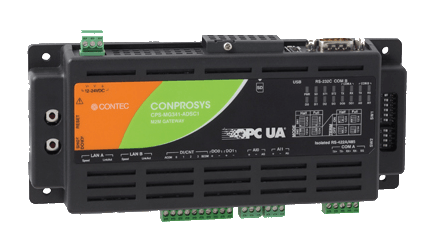
RTime-MC
RTime-CNT = 1
IoT / M2M Controller
1 device for 1 machine
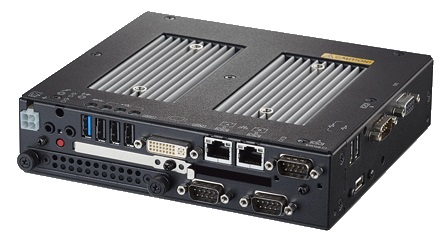
RTime-OEE Server
Industrial Computer
1 device for Server Application
Grand Total
Your Configuration:
Ready to Get Started?
Contact our team for a detailed quotation including installation, training, and support services.
Frequently AskedQuestions
Everything you need to know about RTime-OEE implementation, security, performance, and industry-specific requirements.
Still Have Questions?
Our technical team is ready to help. Get answers from OEE experts who understand your manufacturing challenges.